Accounting Dashboard
& IT Ticketing System
Sabra Health Care — California, USA
The Challenge
Excel Spreadsheets and a $800/Month Tool Doing the Same Job Badly
Sabra Health Care's finance team in California tracked all invoices, expenses, and budget data in Excel spreadsheets. Each Monday morning, a finance analyst spent 4+ hours manually compiling data from multiple spreadsheets into a single consolidated report for leadership — a process that was both time-consuming and error-prone.
Simultaneously, the IT department was paying $800 per month for a third-party ticketing tool that provided more functionality than they needed and required employees to context-switch outside of their Microsoft 365 environment. Adoption was low and the tool generated more admin overhead than it solved.
Leadership wanted to consolidate: replace the Excel-based finance reporting with real-time dashboards, and replace the expensive ticketing tool with something that lived inside SharePoint. The goal was to reduce cost, eliminate the Monday reporting ritual, and give management live visibility into both finance and IT operations.
4+ hours every Monday compiling financial data manually from multiple Excel files into one report
$800/month ($9,600/year) for a third-party IT ticketing tool with low adoption and high admin overhead
No real-time visibility — management only saw data once a week, making timely decisions impossible
IT ticket resolution time was poor — no priority flags, no assignment tracking, no SLA visibility
The Solution
Two Powerful SPFx Systems Built for the Cost of One
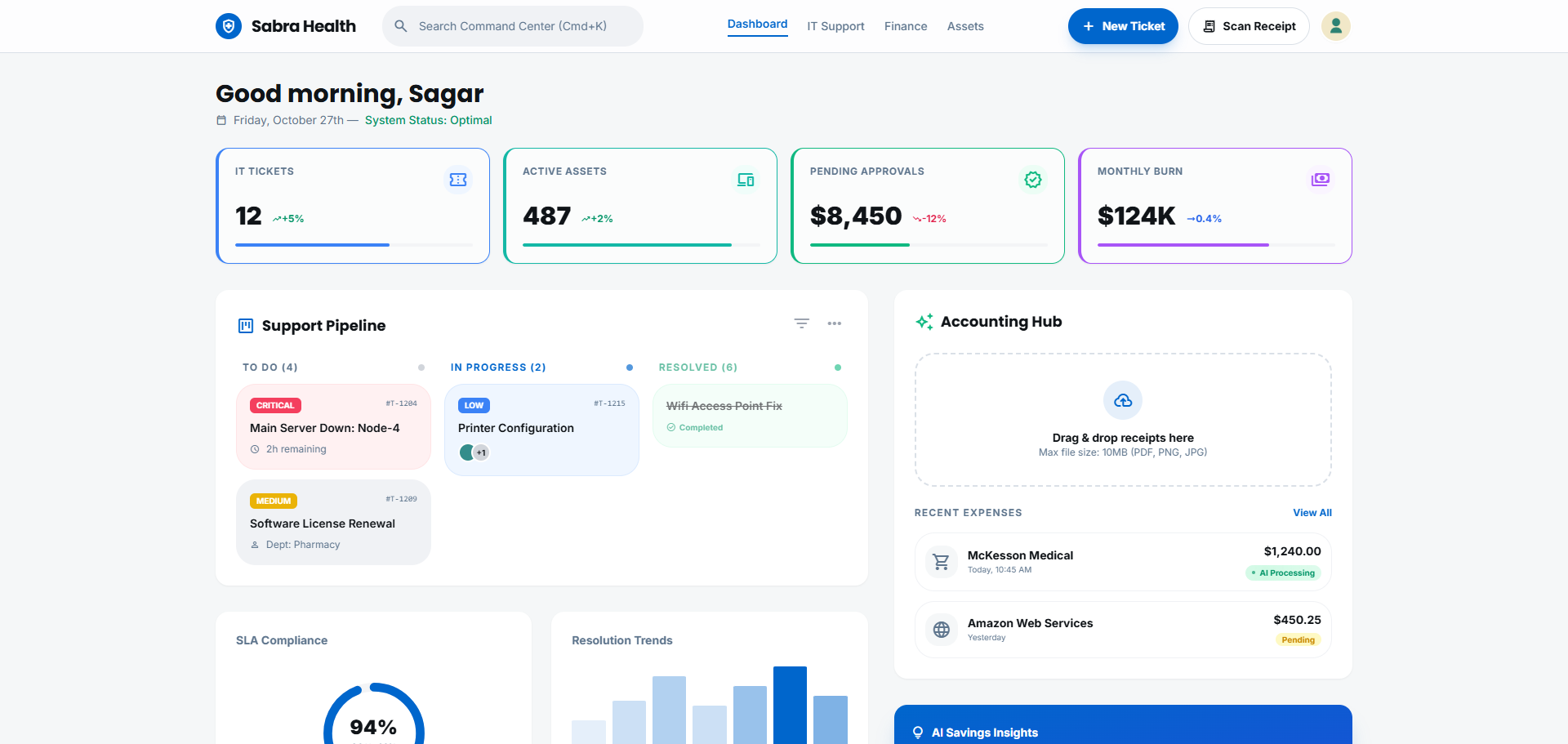
Akshara Technologies delivered two interconnected SPFx solutions on SharePoint Online. The accounting dashboard provides real-time visibility into invoices, expenses, and budget — pulling data from SharePoint Lists that are updated continuously, with no Monday morning compilation required. Filters by date range, department, invoice status, and vendor, with Chart.js visualisations for trend analysis and one-click Excel export for stakeholder reports.
The IT ticketing system is a full-featured web part with priority flags (Critical, High, Medium, Low), category tagging, technician assignment, status tracking (Open, In Progress, Resolved, Closed), and automated Power Automate notifications. Tickets are stored in SharePoint Lists, visible to IT staff in a filtered board view, and searchable by the employee who raised them.
Both systems were deployed within the existing SharePoint Online tenant — no new tools, no new licences, no additional training required beyond the familiar Microsoft 365 environment.
What Was Delivered
Measured Outcomes
Real ROI, Measurable in Days
Project Screenshots
The Dashboard in Action
Technology Stack
Tools & Technologies Used
Start Your Project
Replace Costly Tools with
SharePoint-Native Solutions
If your team is paying for SaaS tools that could be replaced by a well-built SharePoint solution, let's do the maths. You might be surprised how quickly a custom build pays for itself.