Inside Ashcombe — Staff Intranet
for 1,959 University Employees
University of Ashcombe — Staff Intranet
The Challenge
Nearly 2,000 Staff, Six Faculties, and No Single Place to Find Anything
University of Ashcombe's existing intranet was a collection of SharePoint sites built at different times by different teams, with no unified home page, no consistent navigation, and no role-based personalisation. An academic trying to find their HR forms saw the same links as a facilities manager. A researcher looking for grant administration guidance had to know which site to start from.
The fragmentation meant staff ignored the intranet and relied on email and word of mouth instead. Important news — dates and deadlines, policy updates, notices — was sent by email, not published centrally. Managers had no consolidated view of the HR and budget tasks they were supposed to act on. New joiners had no structured starting point to understand how the university worked.
The university needed a single staff intranet that would personalise itself to each employee's role, surface the right tools and shortcuts for that role, aggregate news from across all faculty sites, and provide a navigable A-Z directory of university services — replacing the maze of disconnected sites with one coherent home for all staff.
No role personalisation — academic staff and facilities managers saw identical links, neither found what they needed
University services scattered across dozens of disconnected SharePoint sites — no A-Z index to navigate them
Dates, deadlines, and notices sent by email — staff missed important updates or had no way to look them up later
Managers had no single view of HR and budget tasks — approval queues buried across different systems
The Solution
A Role-Based Staff Intranet That Knows Who You Are
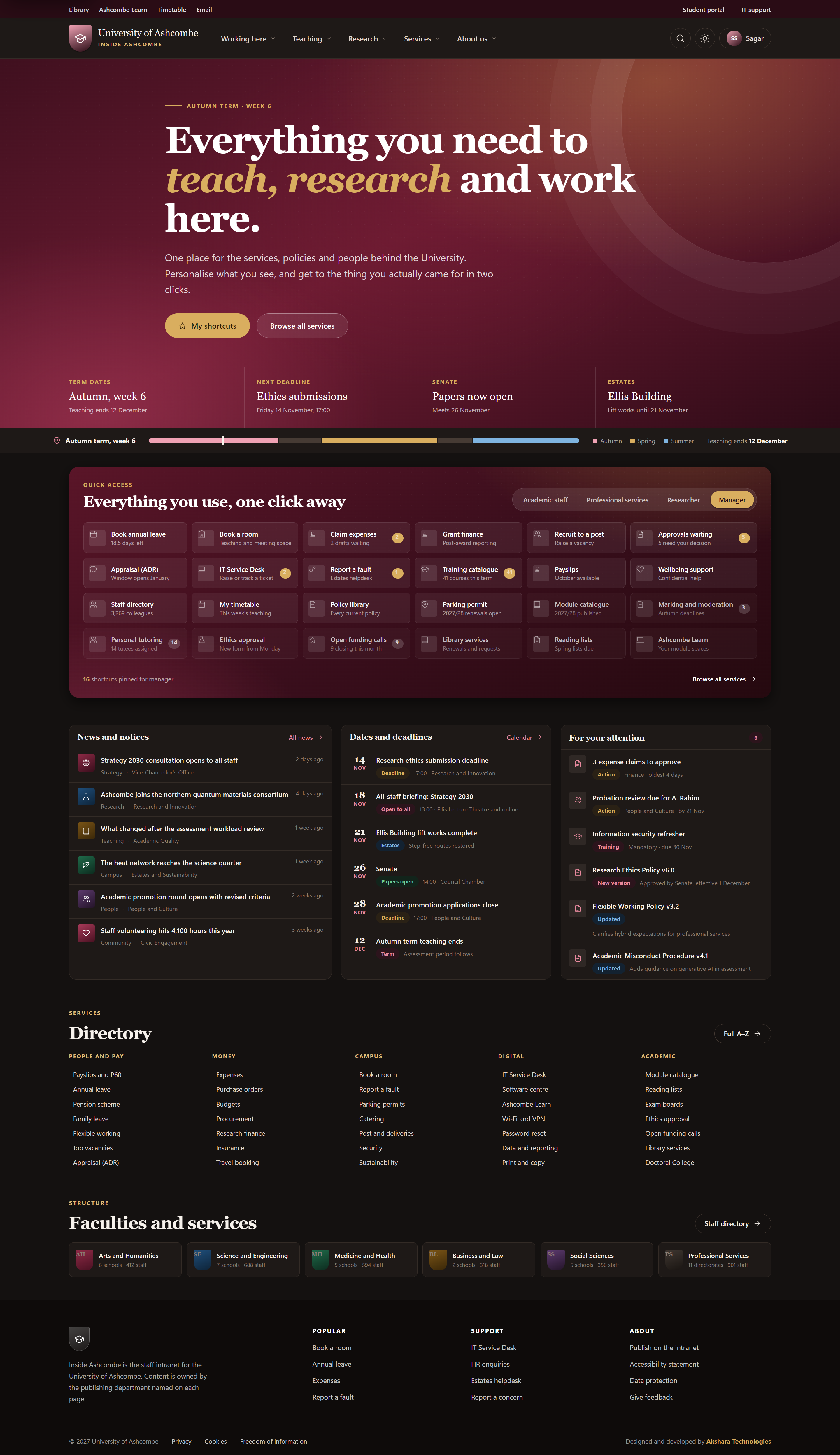
Inside Ashcombe was built on SharePoint Online with Viva Connections, using Azure AD group membership to determine which role-based tab a staff member sees by default. Four tabs — Academic Staff, Professional Services, Researcher, and Manager — each present a different set of 12–16 quick access shortcuts relevant to that role, surfacing tools like teaching resources, HR systems, research administration, budget approval, and reporting in one click.
A news and notices section aggregates posts from all faculty communication sites via SharePoint Search, with date-tagged notices separated from news stories. A "Dates & Deadlines" web part surfaces upcoming university-wide milestones — term dates, submission windows, policy review periods — pulled from a central SharePoint List updated by the Communications team.
The A-Z directory is a custom SPFx web part that surfaces links to all university services, organised into five sections: People & Pay, Money, Campus, Digital, and Academic. Each section shows 6–10 key links with a "View all" option that expands inline. A six-faculty directory shows each faculty with its name and staff count (Arts & Humanities 412, Science & Engineering 188, Medicine & Health 194, Business & Law 108, Social Sciences 356, Professional Services 901) linking to the faculty's own SharePoint site. A "For Your Attention" panel surfaces pending items personalised to the user — HR tasks, approvals, policy acknowledgements — via Microsoft Graph API.
What Was Delivered
Project Screenshots
Inside Ashcombe Staff Intranet
Measured Outcomes
One Home for All 1,959 Staff — Personalised by Role
Technology Stack
Role Personalisation Driven by Azure AD, Not Manual Configuration
Ready to Build This?
Build a Role-Personalised Intranet for Your Organisation
We design and build staff intranets on SharePoint Online and Viva Connections — role-based quick access tabs driven by Azure AD, cross-site news aggregation, A-Z service directories, and personalised attention panels. Delivered in 10–14 weeks.